Private browser check · Free · No sign-up
Drop a spreadsheet. See what needs cleaning.
TidyX is a private data cleaning tool for CSV and XLSX files. Check six common issues in your browser, then sign in only when you want an AI cleaning plan.
Drop a CSV or XLSX here
CSV or XLSX · up to 10 MB · 50,000 rows · nothing leaves your browser
- Browser-only
- No signup to check
- Original untouched
What happens next
What happens after you drop a file
The browser check is the first step. Sign in, upload the same file, and TidyX walks you from profile to export with a checkpoint before anything changes.
- 01
Get a data profile
A deterministic profiler summarizes columns, types, missing values and duplicates - before any AI is involved.
Data profile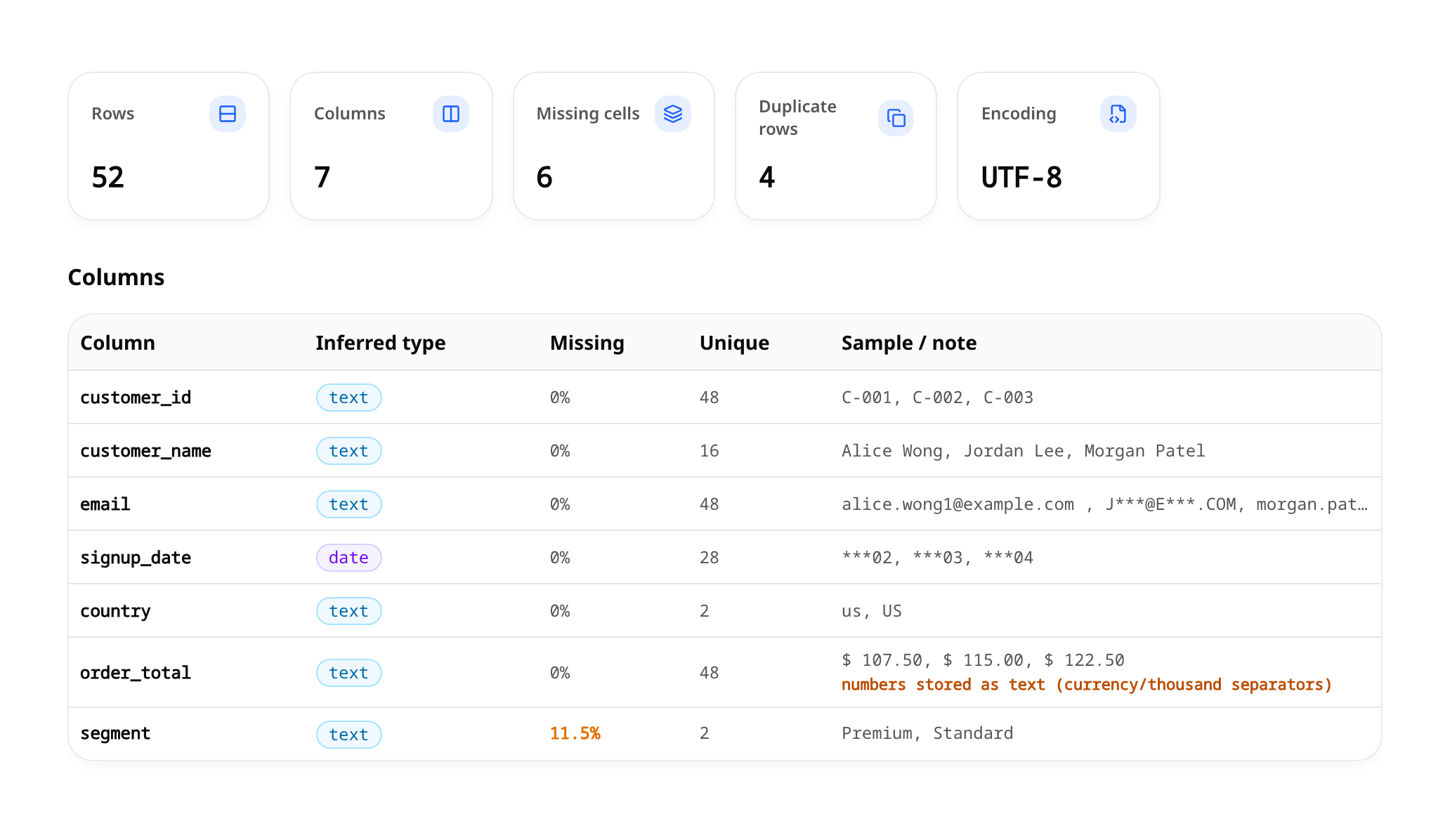
Actual TidyX interface · Synthetic customer order data, profiled before cleaning. - 02
Review the cleaning plan
AI proposes structured rules with rationale, risk level and estimated impact. Edit, accept or skip each one.
Two views of the same plan: Review all for a compact list, or Step by step for one issue at a time. Neither view runs anything.
Review the cleaning plan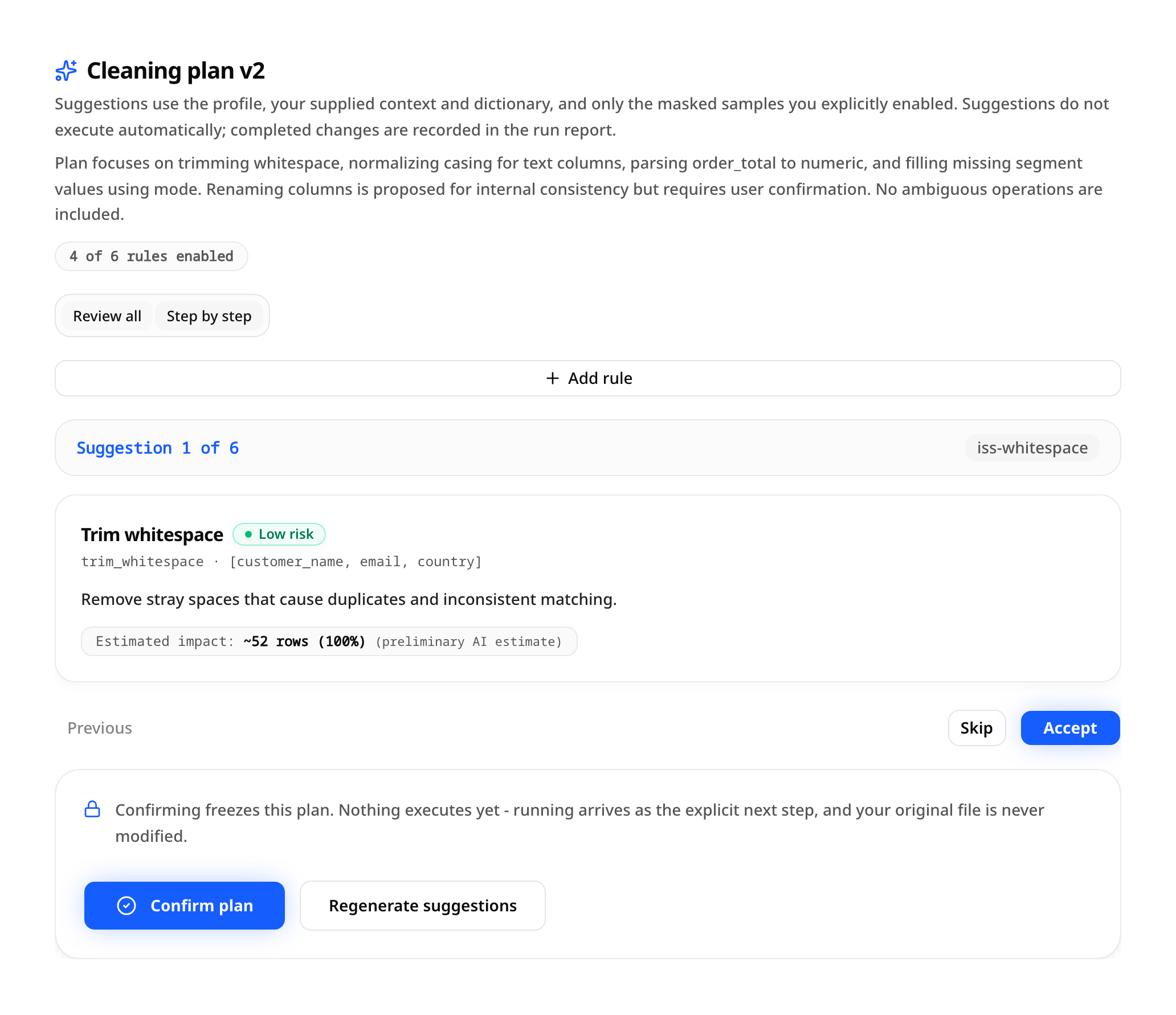
Actual TidyX interface · Review suggested rules before confirming the plan. - 03
Confirm, run and export
After your confirmation a deterministic engine applies the rules and produces the selected cleaned file, a PDF report and a JSON audit.
Cleaning results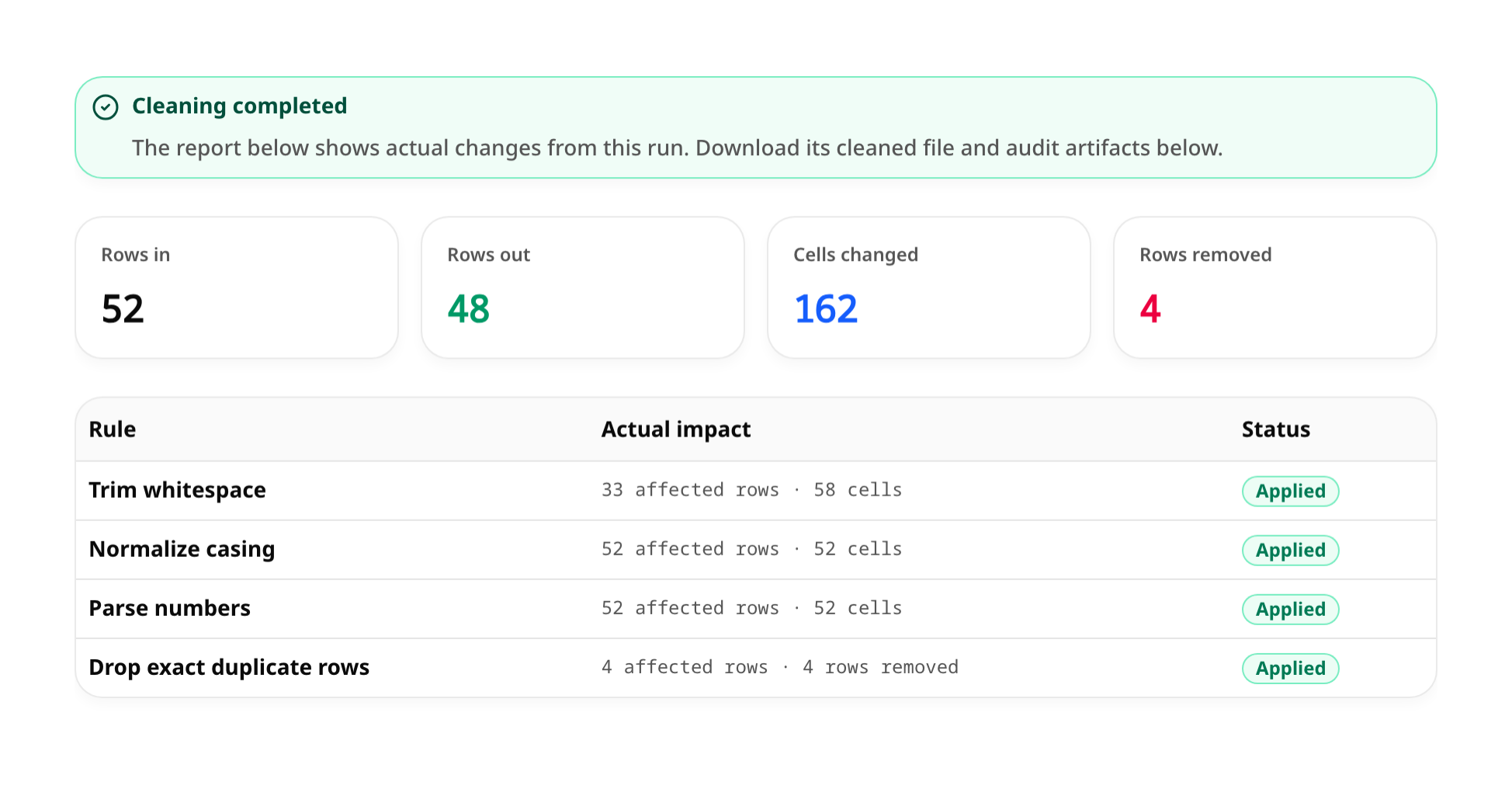
Actual TidyX interface · Results from the same synthetic dataset after an approved run.
Every plan waits for your confirmation, high-risk rules ask again, and the file you uploaded is never modified or overwritten.
Free tools and guides
Fix one thing now, without an account
Two single-task tools run entirely in your browser: review the rows before removal and download a cleaned copy. The guides explain what to look for before you clean.
Your data, handled carefully
Privacy-minded by design
The browser check and free tools never upload anything. When you sign in for an AI plan, your upload is handled as described here.
More detail lives in the privacy policy
Private storage
Files are stored in a private bucket and downloaded through short-lived signed links.
Minimal AI input
AI planning uses statistics plus the context and dictionary you provide. Optional masked samples are off by default and limited to five rows; the full file is not sent.
Retention you control
Your files stay available until you delete their project or your account.
Transparent processing
Reports record exactly which rules ran and what changed, so results can be audited.
Core capabilities
Built for careful data work
Deterministic analysis and a controlled rule set keep every change explainable.
Deterministic profiling
Row counts, column types, missing values, duplicates and outlier candidates are computed by code, not guessed by a model.
Controlled rule set
Cleaning happens through a fixed set of reviewable operations - no free-form code from the AI.
Risk-aware review
Each real rule shows its affected columns, rationale, risk and available impact estimate. Risky rules are clearly flagged.
Originals stay untouched
Runs write new output files. The file you uploaded is never modified or overwritten.
Reproducible runs
Every run keeps its rule snapshot, input/output hashes and engine version for later verification.
Focused run exports
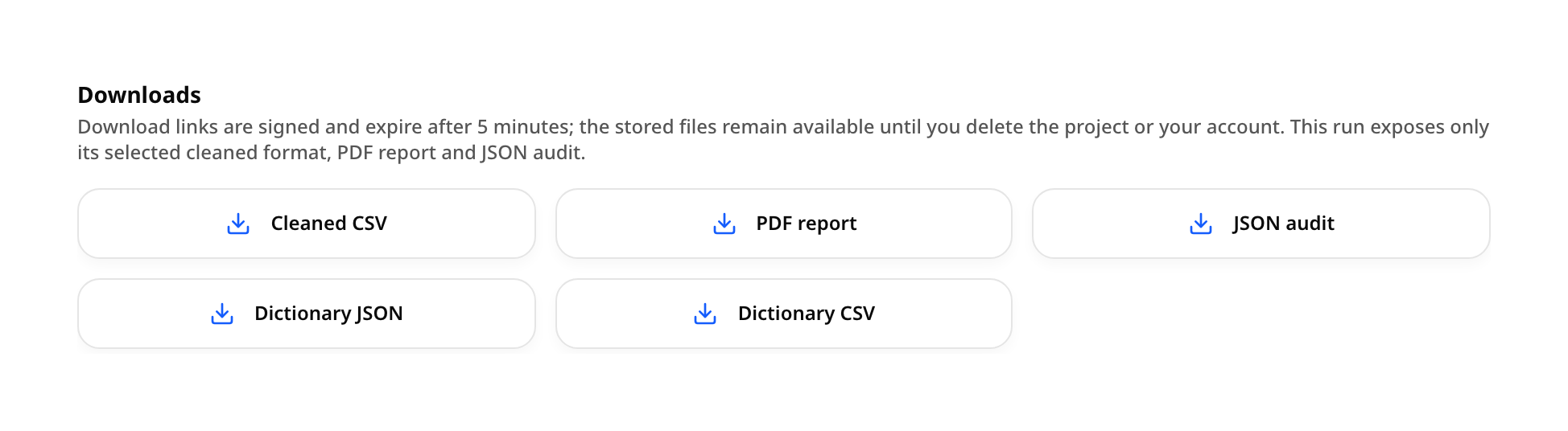
Download the cleaned format selected for the run, a PDF report, a JSON audit and your data dictionary. Python and R downloads are not currently available.
Pricing
Pay for the data you actually clean
Start with 60 free signup credits. Add a one-time Trial pack or choose Monthly or Yearly billing for 750 credits each month. AI planning and cleaning runs are quoted separately before you confirm.
Approximate cleaning counts assume 7 credits for one AI plan plus one simple CSV cleaning run, rounded down for illustration. Actual usage may be higher or lower; these are not guaranteed file allowances. Each step is quoted before confirmation. All per-file limits apply together.
FAQ
Frequently asked questions
Have another question? Email us at support@tidyx.io.
Which file formats are supported?
CSV or XLSX · up to 10 MB · 50,000 data rows · 200 columns · 500,000 cells. XLSX: one worksheet per project.
Will the AI change my data automatically?
No. The AI only proposes structured rules. A deterministic engine applies them after you confirm, and your original file is never overwritten.
What kind of cleaning can it do?
Trimming whitespace, normalizing casing and missing-value tokens, replacing values with an explicit mapping, parsing numbers and dates, casting types, renaming columns, dropping empty rows/columns and exact duplicates, and flagging outliers.
Can I reproduce a cleaning run later?
Each run stores a frozen rule snapshot, file hashes and the engine version, with PDF and JSON audit downloads. Save a successful run as a recipe and check compatibility before applying it to another profiled project. Review and confirmation are still required.
Do I need to write code?
No. You review and adjust rules through controlled options, then download the cleaned file and audit artifacts after the run.
How much does it cost?
Start with 60 one-time signup credits, no card. Paid Trial, Monthly and Yearly plans are on the pricing page; each AI plan and cleaning run is quoted before you confirm.
Ready to clean a file? Drop it at the top.
Run the free browser check first. For the AI plan, sign in and choose the same file again. Every rule waits for your approval.
Drop a file to startAlready have an account? Sign in